Table of contents
Introduction
OSDM offers a standardized API for graphical place reservation. The API consists of a resource to get the availabilities and a resource to get the logical coach deck layout.
While the availability is called after a offer request dynamically, the coach deck layout data should be imported periodically as a master data import.
Fare providers must ensure that coach deck layouts and displayed elements are presented to partners as they appear in the provider’s own sales channels.
Coach deck layouts must represent an entire coach deck, not just a subset (e.g., return all seats, not only those in one compartment).
Getting Availabilities
There are two flows to get place availabilities. Either you pass in a offer id, for which you would like to get availabilities or you pass in a existing booking id.
The availability response is structured as follows: a vehicle consists of coaches which can have multiple decks. The decks consist of different compartment types. The type of compartment is defined by service class, accommodation type and accommodation sub type. For example compartment can be a second class family compartment. For each deck layouts an id references to the logical deck layout.
Compartments consists of places. Places can be seats, couchettes or berth. For each place a status indicates whether it’s free, allocated or restricted. The reservation reference allows to link the place to the correct reservation part.
Optionally it is possible for the reservation system to preselect places or compartments.
Getting Deck Layouts
The deck layout response is a logical description of a coach deck. A coach deck layout is a grid of a given dimension (x, y). All entities describing a coach deck are placed on this grid. The entities are either graphic elements or service icons. A graphical element is e.g. a seat, a staircase, or a toilet . A service icon is e.g. a first class icon indicating a first class service. See graphic items for a list of all graphic items.
Both graphical elements as well as service icons are positioned on the grid according to their defined rectangle which consists of a position (x, y, z) and a size (width, height). A graphical element can also be rotated using a rotation angle. This e.g. allows to use only one graphical element of a seat and to arrange them around a table.
Per convention the grid layout out is in horizontal presentation of a vehicle driving from right to left. The (0, 0) position is at the top left corner of the grid.
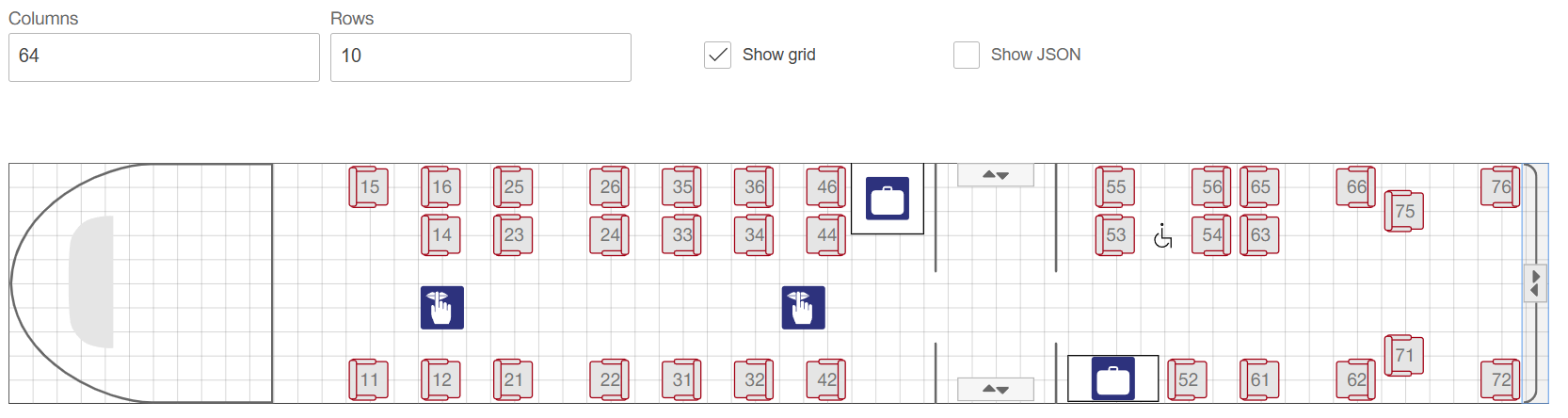
Next is an example with orientation values of graphical elements and seats shown. Zero degree denotes to the right direction, 90 degree to the bottom direction, 180 degree to the left direction and 270 degree to the top direction.
Additionally, some of the graphical elements and service icons are denoted: (1) driver area, (2) silence icon, (3) compartment passage, (4) entry/exit, (5) luggage area and (6) coach passage.

Code List
Coach Deck layout collection
The following collection is used to build and visualize coach deck layouts. The list represents the lowest common denominator of graphic elements that should be understood by all stakeholders. We distinguish between
- Graphical Elements (API Element graphicElements): graphical elements can always be rotated/can have different directions when putting them on the grid.
- Service Icons (API Element serviceIcons): service icons don’t need a rotation degree because of the form of the icon. They don’t need an orientation when putting it on the grid.
Note: “Icon code” and “Mounting Used” are supported until version 3.6 included. Starting from version 3.7 and 4.0, the human‑readable “Element Code” must be used, and “Mounting Used” is deprecated.
| Icon | Description | Element Code | Orientation (in degrees) | API Element | Instruction for use | ||
|---|---|---|---|---|---|---|---|
 |
Seat looking to the right | SEAT |
0 | graphicElements | |||
 |
Seat looking to the left | SEAT |
180 | graphicElements | |||
 |
Seat looking up | SEAT |
270 | graphicElements | |||
 |
Seat looking down | SEAT |
90 | graphicElements | |||
 |
Berth looking to the right | BERTH |
0 | graphicElements | |||
 |
Berth looking to the left | BERTH |
180 | graphicElements | |||
 |
Berth looking down | BERTH |
90 | graphicElements | |||
 |
Berth looking up | BERTH |
270 | graphicElements | |||
 |
Couchette looking to the right | COUCHETTE |
0 | graphicElements | |||
 |
Couchette looking to the left | COUCHETTE |
180 | graphicElements | |||
 |
Table looking down | TABLE |
90 | graphicElements | |||
 |
Table looking up | TABLE |
270 | graphicElements | |||
 |
Big table looking down | BIG_TABLE |
90 | graphicElements | |||
 |
Big table looking up | BIG_TABLE |
270 | graphicElements | |||
 |
Wall with angle to left, height covers three places - looking up | WALL_LEFT_3 |
270 | graphicElements | |||
 |
Wall with angle to right, height covers three places - looking up | WALL_RIGHT_3 |
270 | graphicElements | |||
 |
Wall with angle to left, height covers three places - looking down | WALL_LEFT_3 |
90 | graphicElements | |||
 |
Wall with angle to right, height covers three places - looking down | WALL_RIGHT_3 |
90 | graphicElements | |||
 |
Small wall with angle to left, height covers two places - looking down | WALL_LEFT_2 |
270 | graphicElements | |||
 |
Small wall with angle to right, height covers two places - looking up | WALL_RIGHT_2 |
270 | graphicElements | |||
 |
Small wall with angle to left, height covers two places - looking down | WALL_LEFT_2 |
90 | graphicElements | |||
 |
Small wall with angle to right, height covers two places - looking down | WALL_RIGHT_2 |
90 | graphicElements | |||
 |
Small wall with angle to left, height covers one place - looking down | WALL_LEFT_1 |
270 | graphicElements | |||
 |
Small wall with angle to right, height covers one place - looking up | WALL_RIGHT_1 |
270 | graphicElements | |||
 |
Small wall with angle to left, height covers one place - looking down | WALL_LEFT_1 |
90 | graphicElements | |||
 |
Small wall with angle to right, height covers one place - looking down | WALL_RIGHT_1 |
90 | graphicElements | |||
 |
Wall between two compartments, height covers three places - looking up | T_WALL_COMPARTMENTS_3 |
270 | graphicElements | |||
 |
Wall between two compartments, height covers three places | T_WALL_COMPARTMENTS_3 |
90 | graphicElements | |||
 |
Small wall between 2 compartments, height covers two places - looking up | T_WALL_COMPARTMENTS_2 |
270 | graphicElements | |||
 |
Small wall between 2 compartments, height covers two places - looking down | T_WALL_COMPARTMENTS_2 |
90 | graphicElements | |||
 |
Wall, height covers one place | WALL_1 |
90 | graphicElements | Wall elements should always be used with 90 degrees. | ||
 |
Wall, height covers two places | WALL_2 |
90 | graphicElements | Wall elements should always be used with 90 degrees. | ||
 |
Wall, height covers three places | WALL_3 |
90 | graphicElements | Wall elements should always be used with 90 degrees. | ||
 |
Wall, height covers five places | WALL_5 |
90 | graphicElements | Wall elements should always be used with 90 degrees. | ||
 |
Arrow indicating upper level | ARROW_UPPER_LEVEL_LEFT |
90 | graphicElements | |||
 |
Arrow indicating lower level tbd | ARROW_LOWER_LEVEL_LEFT |
90 | graphicElements | |||
 |
Arrow indicating upper level tbd | ARROW_UPPER_LEVEL_RIGHT |
90 | graphicElements | |||
 |
Arrow indicating lower level tbd | ARROW_LOWER_LEVEL_RIGHT |
90 | graphicElements | |||
 |
Small Window | WINDOW_1 |
0 | graphicElements | Windows should always be used with 0 degrees. | ||
 |
Medium window | WINDOW_2 |
0 | graphicElements | Windows should always be used with 0 degrees. | ||
 |
Big window | WINDOW_3 |
0 | graphicElements | Windows should always be used with 0 degrees. | ||
 |
Door with left opening (traditional) | DOOR_OPENING_LEFT |
180 | graphicElements | |||
 |
Door with left opening (traditional) | DOOR_OPENING_LEFT |
90 | graphicElements | |||
 |
Door with left opening (traditional) | DOOR_OPENING_LEFT |
0 | graphicElements | |||
 |
Door with left opening (traditional) | DOOR_OPENING_LEFT |
270 | graphicElements | |||
 |
Door with right opening (traditional) | DOOR_OPENING_RIGHT |
180 | graphicElements | |||
 |
Door with right opening (traditional) | DOOR_OPENING_RIGHT |
90 | graphicElements | |||
 |
Door with right opening (traditional) | DOOR_OPENING_RIGHT |
0 | graphicElements | |||
 |
Door with right opening (traditional) | DOOR_OPENING_RIGHT |
270 | graphicElements | |||
 |
Door (sliding) | SLIDING_DOOR |
180 | graphicElements | |||
 |
Door (sliding) | SLIDING_DOOR |
90 | graphicElements | |||
 |
Entry/Exit | ENTRY_EXIT |
90 | graphicElements | |||
 |
Entry/Exit | ENTRY_EXIT |
270 | graphicElements | |||
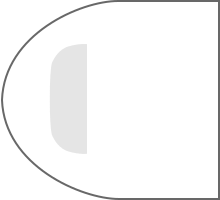 |
Driver Area looking to the left | DRIVER_AREA |
180 | graphicElements | |||
 |
Driver Area looking to the right | DRIVER_AREA |
0 | graphicElements | |||
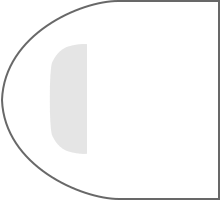 |
Driver Area Tram looking to the left | TRAIN_DRIVER_AREA |
180 | graphicElements | |||
 |
Driver Area Tram looking to the right | TRAIN_DRIVER_AREA |
0 | graphicElements | |||
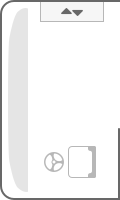 |
Driver Area Bus looking to the left | BUS_DRIVER_AREA |
180 | graphicElements | |||
 |
Driver Area Bus looking to the right | BUS_DRIVER_AREA |
0 | graphicElements | |||
 |
Coach passage looking to the left | COACH_PASSAGE |
180 | graphicElements | |||
 |
Coach passage looking to the right | COACH_PASSAGE |
0 | graphicElements | |||
 |
Coach wall - no passage looking to the left | COACH_WALL_NO_PASSAGE |
180 | graphicElements | |||
 |
Coach wall - no passage looking to the right | COACH_WALL_NO_PASSAGE |
0 | graphicElements | |||
 |
Wheelchair space | WHEELCHAIR_SPACE |
- | serviceIcon | |||
 |
2nd class area | SECOND_CLASS_AREA |
- | serviceIcon | |||
 |
1st class area | FIRST_CLASS_AREA |
- | serviceIcon | |||
 |
Bar area | BAR_AREA |
- | serviceIcon | |||
 |
Mobile phone area | MOBILE_PHONE_AREA |
- | serviceIcon | |||
 |
Mobile phone forbidden area | MOBILE_PHONE_FORBIDDEN_AREA |
- | serviceIcon | |||
 |
PRM area | PRM_AREA |
- | serviceIcon | |||
 |
Family area | FAMILY_AREA |
- | serviceIcon | |||
 |
Restaurant area | RESTAURANT_AREA |
- | serviceIcon | |||
 |
Bicycle area | BICYCLE_AREA |
- | serviceIcon | |||
 |
Luggage area | LUGGAGE_AREA |
- | serviceIcon | |||
 |
Luggage locker | LUGGAGE_LOCKER |
- | serviceIcon | |||
 |
Conference compartment | CONFERENCE |
- | serviceIcon | |||
 |
Space for prams | PRAM_AREA |
- | serviceIcon | |||
 |
Wardrobe area | WARDROBE_AREA |
- | serviceIcon | |||
 |
Dust bin | BIN |
- | serviceIcon | |||
 |
Toilet | TOILET_AREA |
- | serviceIcon | |||
 |
Silence area | SILENCE_AREA |
- | serviceIcon | |||
 |
Children play area | PLAYGROUND_AREA |
- | serviceIcon | |||
 |
Non-smoker area | NON_SMOKING_AREA |
- | serviceIcon | |||
 |
Power socket | POWER_SOCKET |
- | serviceIcon | |||
 |
Priority Seat | PRIORITY_SEAT |
- | serviceIcon | |||
 |
WiFi area | WIFI_AREA |
- | serviceIcon | |||
 |
PRM toilet | PRM_TOILET |
- | serviceIcon | |||
 |
Air conditioning | AIR_CONDITIONING |
- | serviceIcon | |||
 |
USB port for charging | USB_SOCKET |
- | serviceIcon | |||
 |
Reclining seat | RECLINABLE_SEAT |
- | serviceIcon | |||
 |
Stairs upwards | STAIR_UPWARDS_AREA |
- | serviceIcon | |||
 |
Stairs downwards | STAIR_DOWNWARDS_AREA |
- | serviceIcon | |||
 |
Working compartment | WORKING_AREA |
- | serviceIcon | |||
 |
Cabin for passengers with allergies | ANTI_ALLERGIC_AREA |
- | serviceIcon | |||
 |
Meeting lounge for 7 people (Pendolino) | MEETING_AREA_7 |
- | serviceIcon | |||
 |
Meeting lounge for 12 people | MEETING_AREA_12 |
- | serviceIcon | |||
 |
Ski area | SKI_AREA |
- | serviceIcon | |||
 |
Conductor working compartment | STAFF_AREA |
- | serviceIcon | |||
 |
Mobile phone booth | PHONE_BOOTH |
- | serviceIcon | |||
 |
T-loop (audio induction loop) | T_LOOP |
- | serviceIcon | |||
 |
Pets area | PETS_AREA |
- | serviceIcon | |||
 |
Sleeping cabin with toilet and shower | SLEEPING_CABIN_TOILET_SHOWER |
- | serviceIcon | |||
 |
Interconnectible sleeping compartments | CONNECTABLE_COMPARTMENTS |
- | serviceIcon | |||
 |
Shower | SHOWER |
- | serviceIcon | |||
 |
Baby-care table | BABY_CARE_TABLE |
- | serviceIcon | |||
 |
Toddler Area | TODDLER_AREA |
- | serviceIcon | |||
 |
Push-button operated wheelchair ramp | WHEELCHAIR_PUSH_BUTTON |
- | serviceIcon | |||
 |
Sink/washbasin | SINK |
- | serviceIcon | |||
 |
Women’s compartment | WOMEN_COMPARTMENT |
- | serviceIcon | |||
 |
Multi Function Area | MULTI_FUNCTION_AREA |
- | serviceIcon |
Custom elements
In addition to the list above, it is of course possible (based on bilateral agreements) to use partner-specific elements with their own codes (that have to be defined bilaterally).
Compartment passage
The passage between two compartments (“compartment passage”) should not be represented by one icon like this one:

but by two separate wall icons arranged one above the other with a gap between them (e.g. “WALL_1” and “WALL_2”).
External Service Icons
Note: External service icons are decommissioned starting with version 4.0 (included).
| Icons concerning the entire coach | description | icon code | Code of Service Icon |
|---|---|---|---|
 |
1st class coach | 121 | FIRST_CLASS_ICON |
 |
2nd class coach | 122 | SECOND_CLASS_ICON |
 |
mobile phone coach | 127 | MOBILE_PHONE_ICON |
 |
mobile phone forbidden in the entire coach | 128 | MOBILE_PHONE_FORBIDDEN_ICON |
 |
silence coach | 126 | SILENCE_ICON |
 |
bistro | 123 | BISTRO_ICON |
 |
restaurant car | 124 | RESTAURANT_ICON |
 |
bicycle coach | 125 | BICYCLE_ICON |
 |
bicycle coach (lower hock) | - | BICYCLE_LOW_ICON |
 |
bicycle coach (middle hock) | - | BICYCLE_MIDDLE_ICON |
 |
bicycle coach (upper hock) | - | BICYCLE_UPPER_ICON |
 |
mixed group/individual coach | 129 | MIXED_GROUP_ICON |
 |
WiFi area | 139 | WIFI_ICON |
 |
air condition | 140 | AC_ICON |
 |
USB ports for charging | 141 | USB_PORT_ICON |
 |
business class | 142 | BUSINESS_ICON |
 |
panorama coach | 143 | PANORAMA_ICON |
 |
luggage coach | 173 | LUGGAGE_ICON |
 |
sleeping car | 174 | SLEEPING_CAR_ICON |
 |
car-carrier | 175 | CAR_CARRIER_ICON |
 |
multi function | - | MULTI_FUNCTION_ICON |
 |
wheelchair | - | WHEELCHAIR_ICON |
 |
pram | - | PRAM_ICON |
 |
playground | - | PLAYGROUND_ICON |
 |
easy access | - | EASY_ACCESS_ICON |
 |
toilet | - | TOILET_ICON |
 |
toilet supporting wheelchairs | - | TOILET_PRM_ICON |
 |
ski | - | SKI_ICON |